amazon private brands
Product Lifecycle Management
Creating a self-service workflow configuration and execution platform to accelerate private label product speed-to-market by ~30% and manage 250+ step processes for a multi-billion dollar global product development operation.
The Problem
In 2019 Amazon's private label product development process were primarily manual and many products took 1-2 years to develop (speed-to-market or STM), which made it challenging to compete with companies like Teemu and Shein in certain product categories or grow the private label business. To address this, we evaluated exteral solutions and determined we needed to build internally to meet our needs. As part of the overall platform we needed to support robust workflows with over 250 steps to manage and track product development work across three major organizations—Softlines, Hardlines, and Consumables. Each organization had different processes, personas, and definitions of "product," yet they all needed to execute complex, constantly changing workflows.
To accelerate our product speed-to-market we identified key challenges:
- Lack of Visibility: Business requirements and processes changed frequently, but there was no visibility into where bottlenecks existed in the current process
- Compounding Effects: Without visibility, business leaders couldn't accurately determine capacity, resource plan to manage bottlenecks, or understand which bottlenecks had the most significant impact
- Process Fragmentation: Three different organizations had different processes for the same activities, making standardization difficult
- Scale & Complexity: A single product (e.g., a shirt) could spawn 2,000 child products (10 styles × 20 colors × 10 sizes), each requiring distinct workflow management
- No Metrics: The business operated on email, Excel, and institutional memory with no data-driven insights into process efficiency
My Role
As the Principal UX Designer, I was responsible for designing the end-to-end workflow system from scratch, including both the self-service configuration tools for business admins and the execution experience for end users. My day to day responsibilities also included participating in leadership strategy meetings, working with stakeholders and users across three large organizations, PMs, and users to identify requirements and break requirements into meaningful phases. I also contributed to roadmap planning meetings where I facilitate those discussions between PM, UX, and Dev to brainstorm, group, and prioritize ideas from team members. My responsibilities also included maintaining good implementation hygiene for design system components, patterns, and standards for all features we delivered.
The Solution
I designed a comprehensive, self-service workflow system that gave Amazon Private Brands the ability to configure, execute, and measure complex product development processes without engineering support. The system was built on BPMN standards and consisted of two major components:
1. Self-Service Configuration Platform
Business admins could design workflows visually using BPMN-informed flow diagrams, configure robust task definitions with assignment rules, conditional logic, and dynamic expansion for complex scenarios. The system supported shareable components, allowing teams to build libraries of reusable workflow patterns. It also allowed users to deploy workflow changes to beta (for testing) and production environments.
2. Execution & Collaboration Experience
End users received clear visibility into what work needed to be done, with tools and resources to complete tasks efficiently. The system included conversation threads (both internal and external) to enable collaboration internally and externally, task assignment across many contributors, contextual actions to execute work inline, and deep linking to relevant data and forms.
The Strategic Tradeoff
The initial MVP required hard tradeoffs: no batch editing, no contextual task execution, and users were deep-linked to existing pages that weren't optimized for task flow. While painful in the short term, this compromise gave the business immediate visibility into task-level dwell time and bottleneck identification—data that didn't previously exist. This visibility unlocked buy-in for deeper UX investments and enabled data-driven process optimization.
The workflow system transformed the business from speculative understanding to measurable, data-driven decision-making, providing clarity on capacity planning, process inefficiencies, and resource allocation.
Additional Project Context
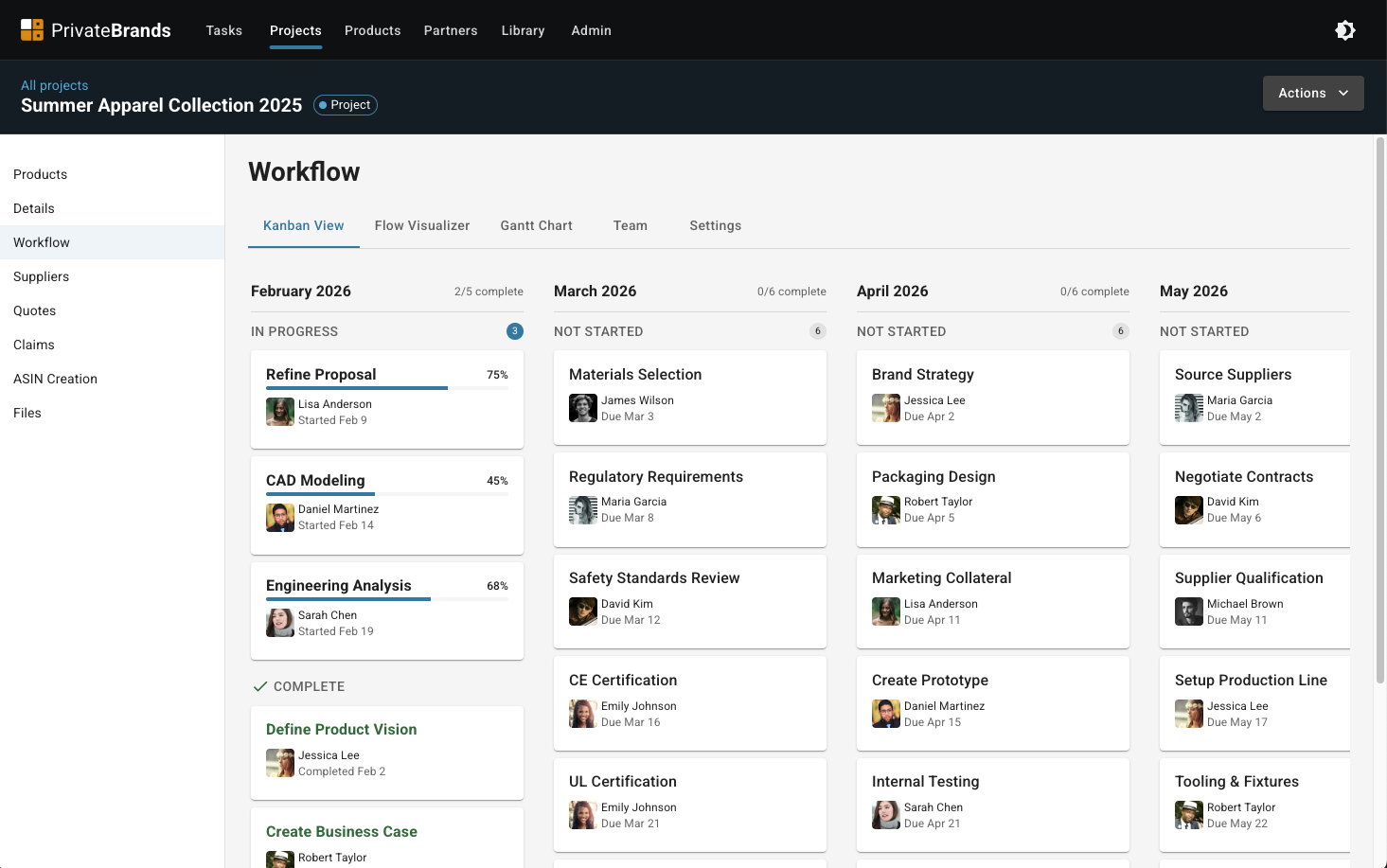
Task Execution
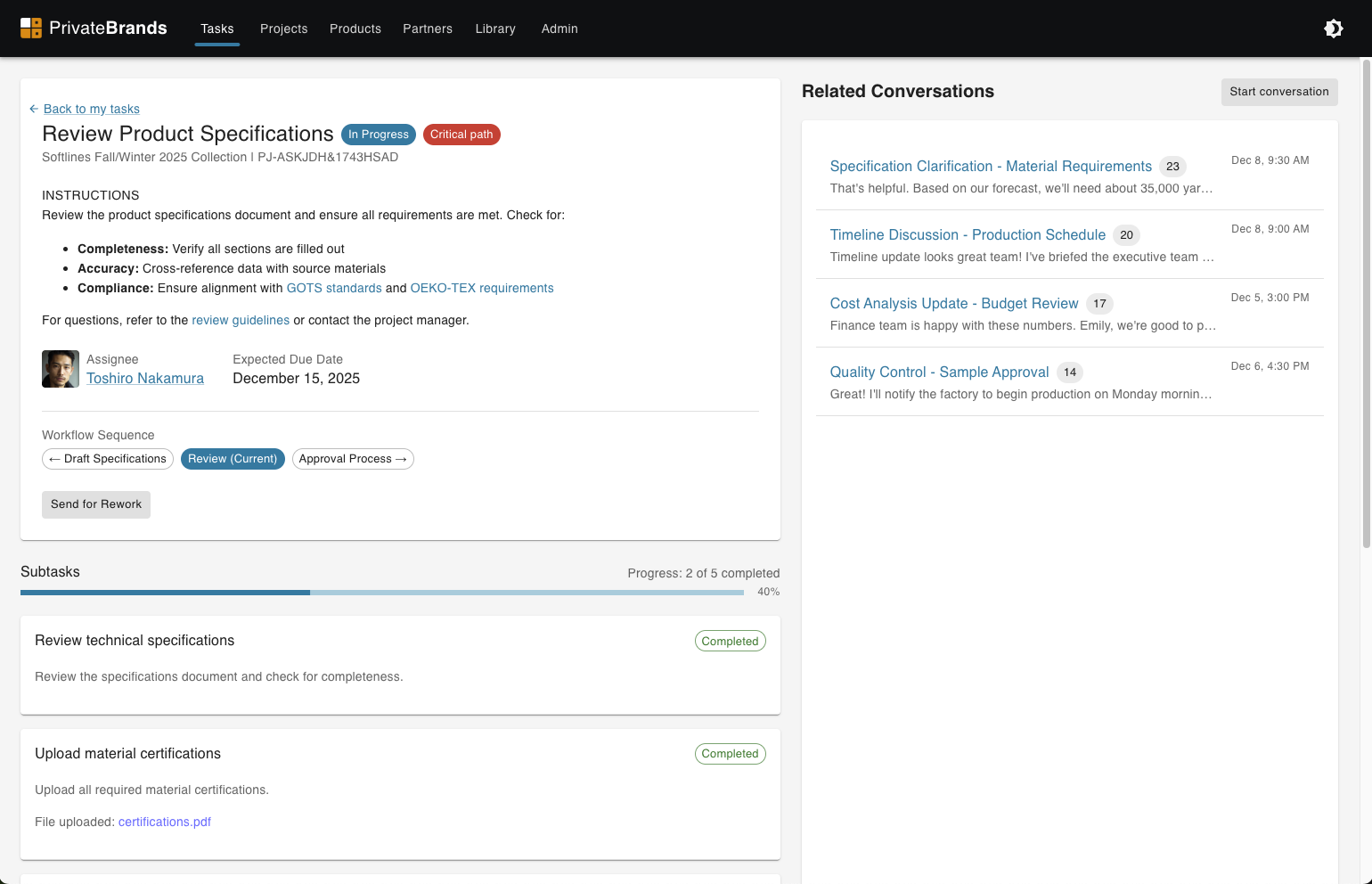
The task execution experience was designed to help users understand what work needed to be done and provide efficient access to the tools and data required to complete it. Users could see all assigned tasks, filter by status or due date, and access detailed task information.
Key Features:
- Task Dashboard: Clear overview of all assigned tasks with status, due dates, and priority
- Task Details: Instructions, resources, conversation threads, and completion requirements
- Deep Linking: Direct access to relevant forms and data views (initial MVP approach)
- Collaboration: Internal and external conversation threads to resolve blockers
- Status Tracking: Real-time visibility into task progress and dwell time
- Notifications: Email and in-app notifications for new assignments and updates
Evolution: The initial MVP used deep linking to existing pages. Later iterations added contextual editing, batch operations, and the ability to complete tasks without leaving the task view—significantly reducing cognitive load and improving efficiency.
Workflow Configuration
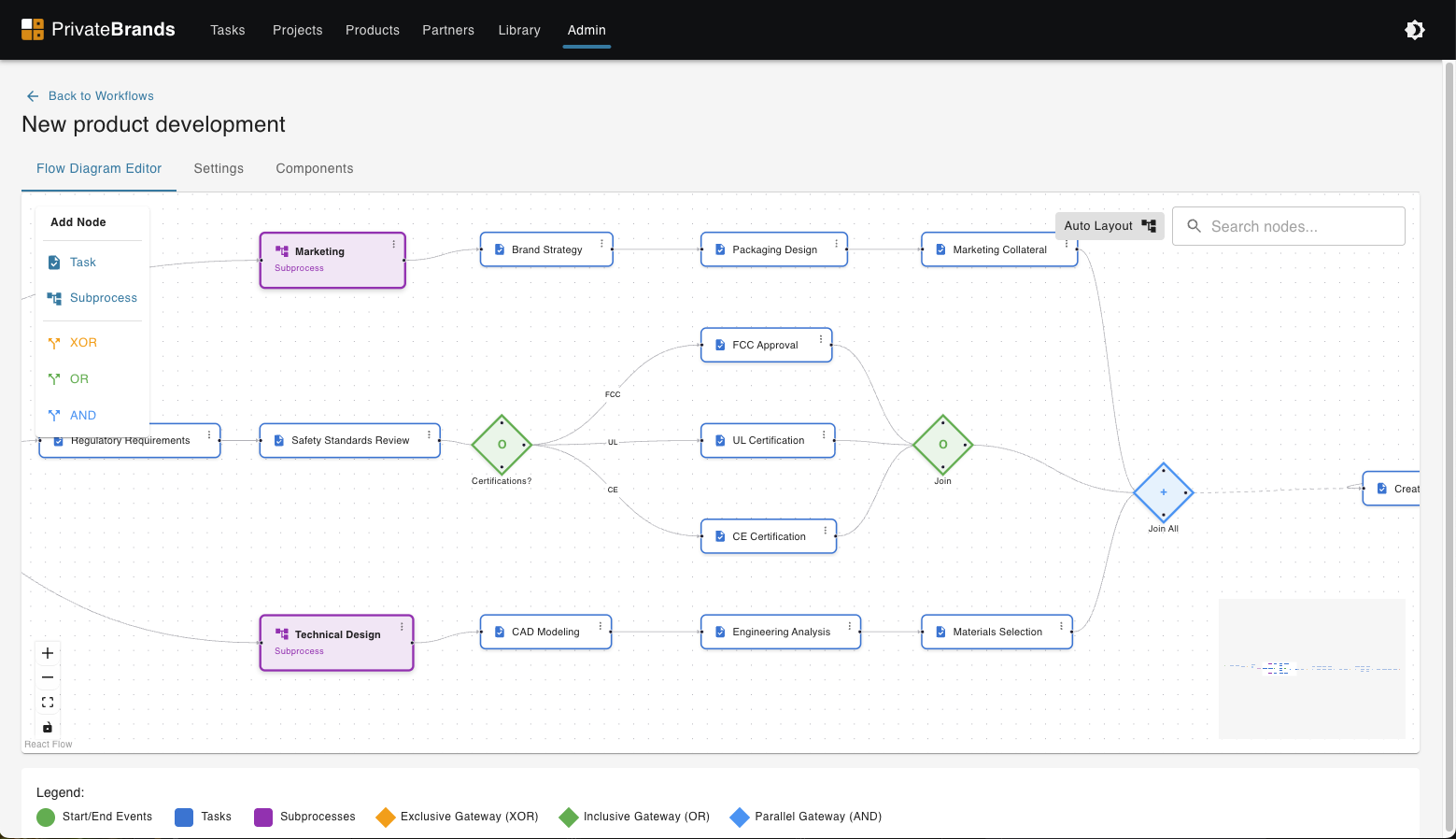
The workflow configuration interface enabled business admins to design complex, multi-step workflows without engineering support. Built on BPMN standards, the interface provided a visual flow diagram editor where admins could define sequential and parallel tasks, conditional branching, and dynamic task expansion.
Key features included workflow versioning, validation rules to prevent configuration errors, and the ability to preview workflows before publishing. The system supported detailed task definitions including assignment rules, due dates, dependencies, and approval chains.
Shareable Components
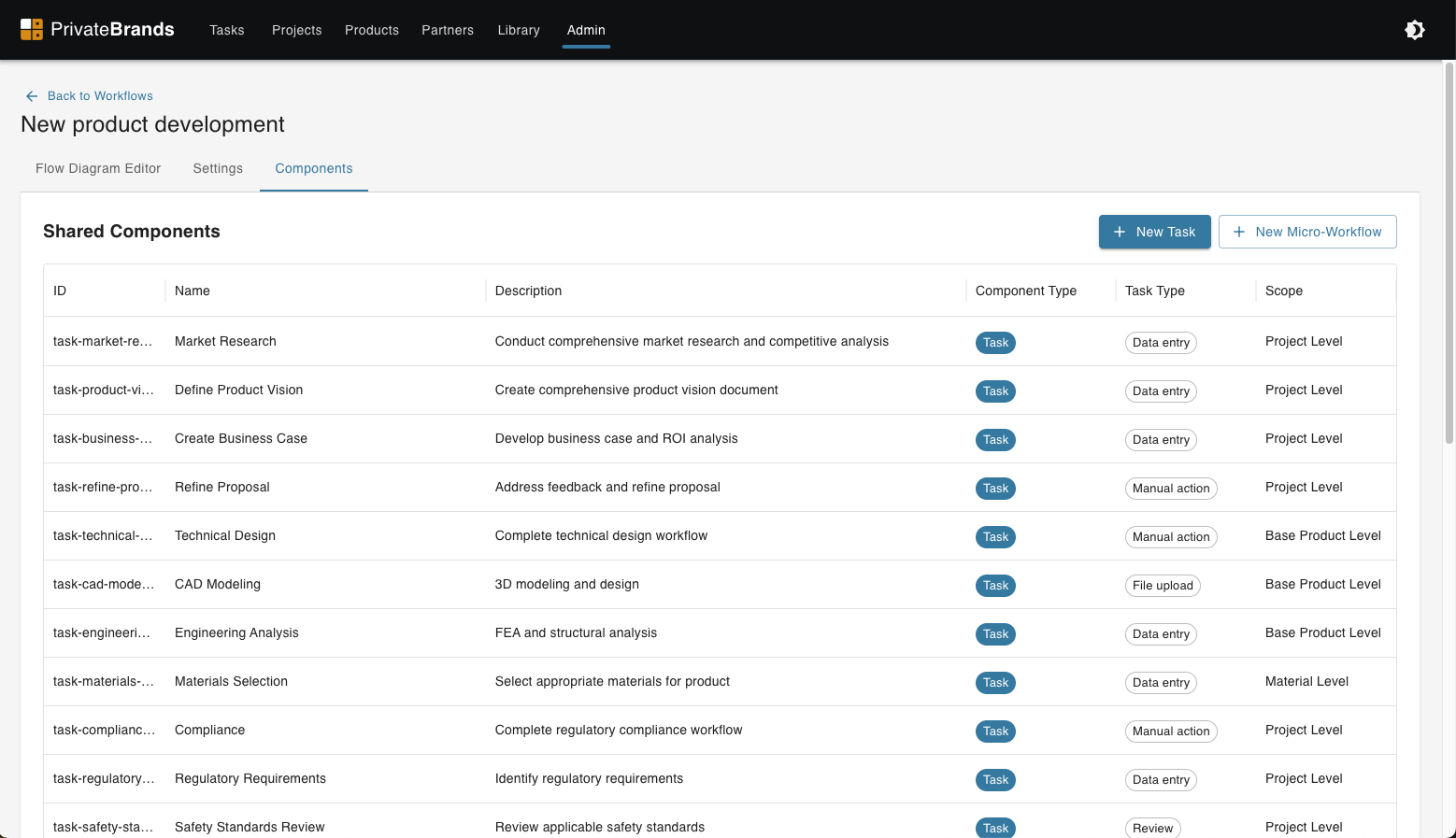
To improve efficiency and standardization across workflows, I designed a component library system that allowed admins to create reusable workflow patterns. These shareable components could be configured once and reused across multiple workflows, reducing configuration time and ensuring consistency.
Benefits of shareable components:
- Consistency: Standardized patterns across different product families
- Efficiency: Configure once, use many times
- Maintenance: Update a component and all workflows using it inherit the changes
- Best Practices: Capture and share proven workflow patterns across organizations
Flow Diagram Design
The visual flow diagram followed BPMN standards, making workflows understandable to both technical and non-technical stakeholders. Each workflow was represented as a connected series of tasks, decision points, and parallel processes.
The diagram design included swim lanes to show which roles or departments were responsible for different parts of the workflow, clear visual indicators for task status and bottlenecks, and the ability to zoom in/out for overview or detailed views of specific workflow sections.
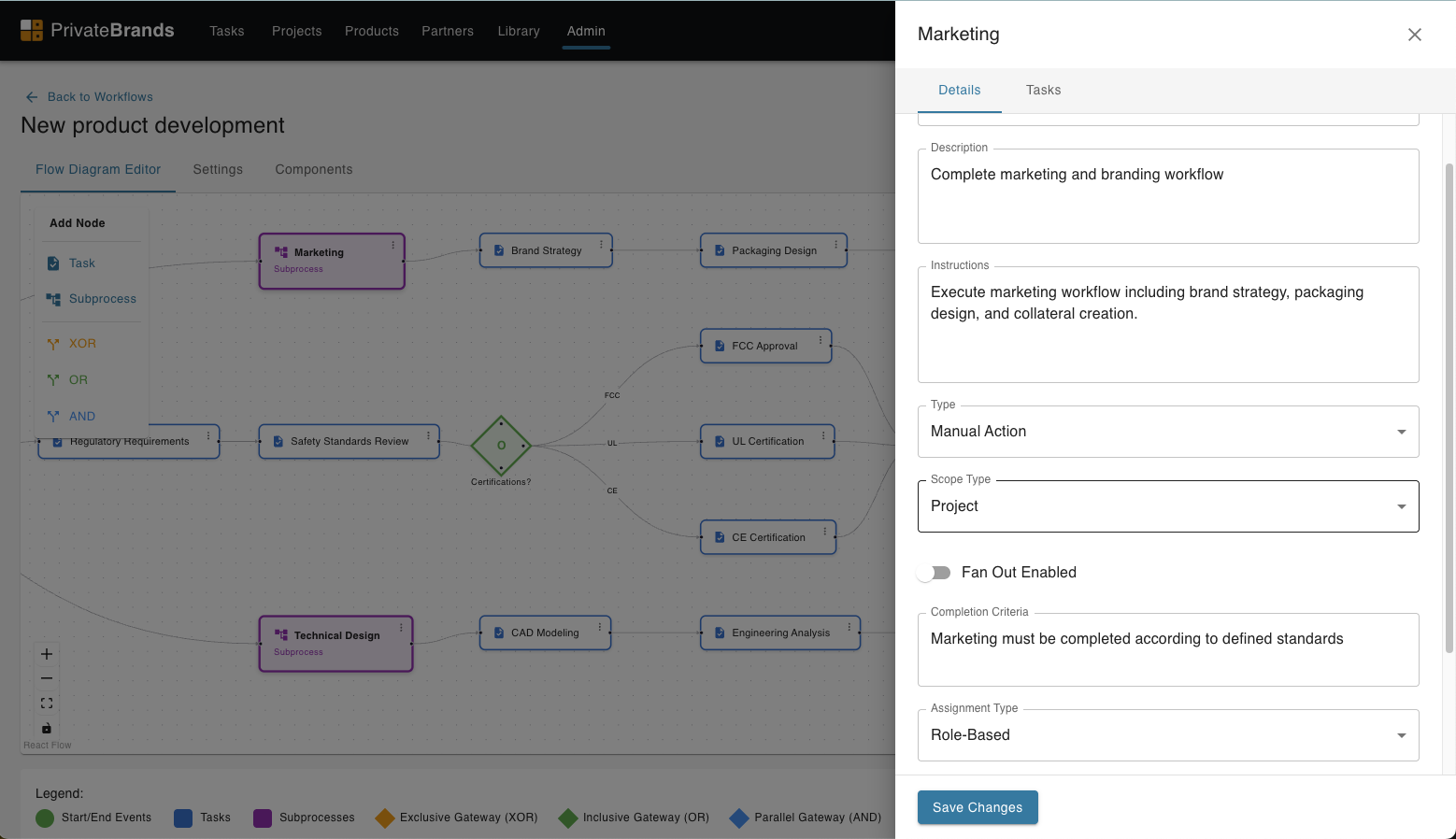
Task Configuration
Task configuration was the most critical and complex part of the workflow system. Each task needed to support a wide variety of scenarios across different product types and organizational requirements.
Configuration options included:
- Assignment Rules: Define who receives the task based on role, product type, or dynamic conditions
- Dynamic Expansion: Automatically create tasks for complex entities (e.g., one task per color variation)
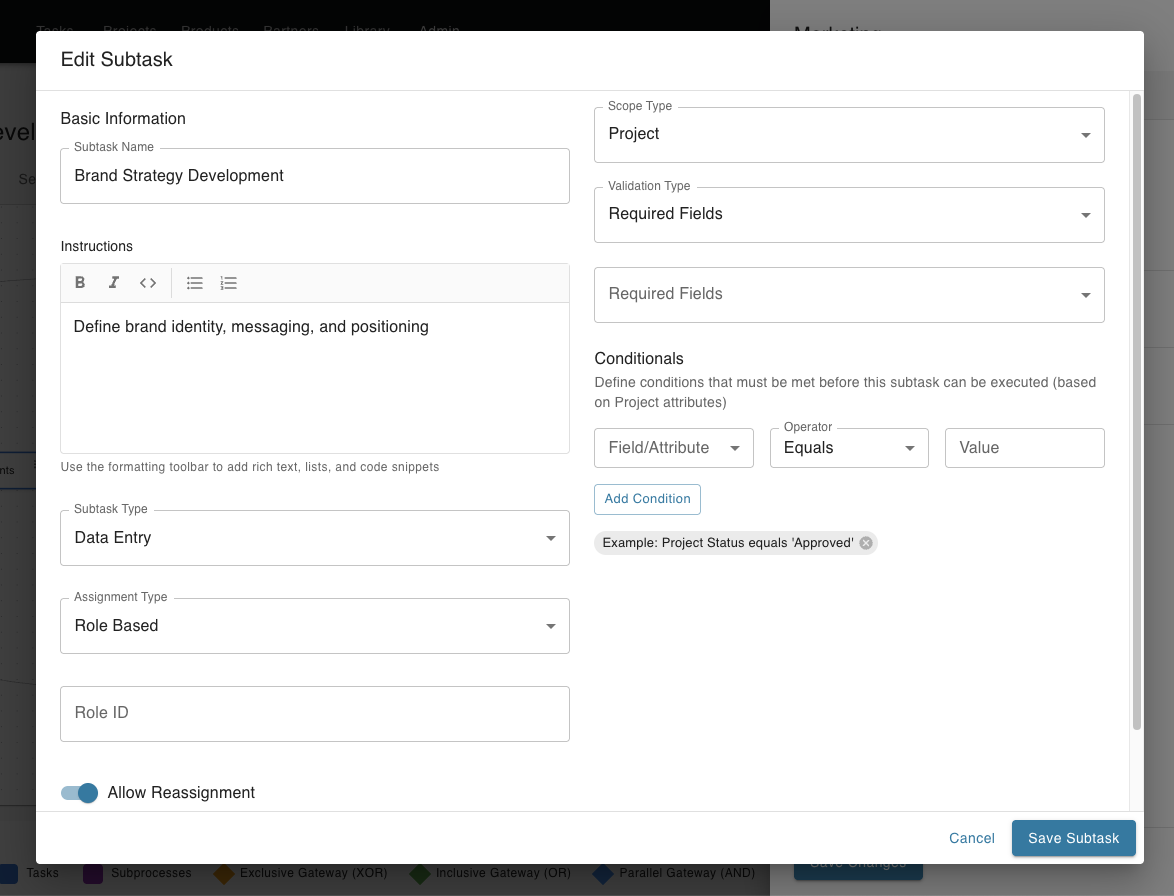
- Conditional Logic: Show or hide tasks based on product attributes or previous task outcomes
- Instructions & Resources: Rich text editor for task instructions, attached documents, and helpful links
- Due Dates & SLAs: Configurable timing rules with escalation paths
- Data Scope: Define which entity fields the task allows users to edit
- Validation Rules: Required fields and data quality checks before task completion
The configuration interface needed to handle hundreds of data fields across many different entities (products, materials, certifications, claims, catalog data, etc.), often with interdependencies or relationships between entities.
Sub-Task Configuration
Sub-tasks allowed for more granular breakdown of complex work. They could be configured to run in parallel or sequentially, with their own assignment rules and due dates. This was particularly useful for tasks that required input from multiple people or teams.
Sub-tasks inherited some properties from their parent task but could override others, providing flexibility while maintaining consistency. The system tracked completion of all sub-tasks before marking the parent task as complete.
Impact & Outcomes
Data-Driven Decision Making:
- First-time visibility into task-level dwell time and bottleneck identification
- Enabled capacity planning and resource allocation based on actual metrics
- Clear understanding of which process inefficiencies had the most significant impact
Operational Efficiency:
- Self-service configuration eliminated the need for engineering resources to create or modify workflows
- Workflows could be adjusted quickly in response to changing business requirements
- Standardized processes across three major organizations while maintaining necessary flexibility
Strategic Outcomes:
- Provided the foundation for process optimization and automation initiatives
- Consolidated fragmented email and Excel-based processes into a single source of truth
- Enabled compliance tracking and audit trails for regulatory requirements
- Created scalable infrastructure supporting billions of dollars in product development
Long-Term UX Vision Adoption:
After years of advocacy, the "walk the store" sessions with senior leadership led to immediate roadmap pivots. Key UX improvements were finally prioritized, including AG Grid table implementations, batch actions, data inheritance, and contextual editing capabilities—features that dramatically improved usability and reduced user attrition.
Annual reduction in development cycles
Reduction in speed-to-market
Annual savings in manual work